So you can see the book in your head, but you can't draw it. Here's the short answer: to illustrate a book with AI, you don't type one clever prompt and hope. You define your characters and style once, write each page, and let the AI illustrate that page with your cast already filled in. You direct; the AI draws.
That sentence is the whole reframe. Most people meet AI art as a slot machine: type words, pull the lever, take whatever drops out. Fine for one pretty picture. A disaster for a book, where the same kid has to show up on page two looking like she did on page one.
Why does AI illustration fall apart over a whole book?
Because each image is generated alone, with no memory of the last one. Ask a generic image tool for "a girl with red boots and a gap-toothed grin" twelve times and you get twelve different girls. The boots wander. The grin disappears. By page seven she's a stranger.
Kids notice this faster than adults do. A four-year-old who knows their favorite character cold will close the book the second the face stops matching. So the real problem isn't "can AI make a nice picture." It's can it make the same picture's hero, page after page. That's a structure problem, not a prompt problem.
What's the actual workflow, step by step?
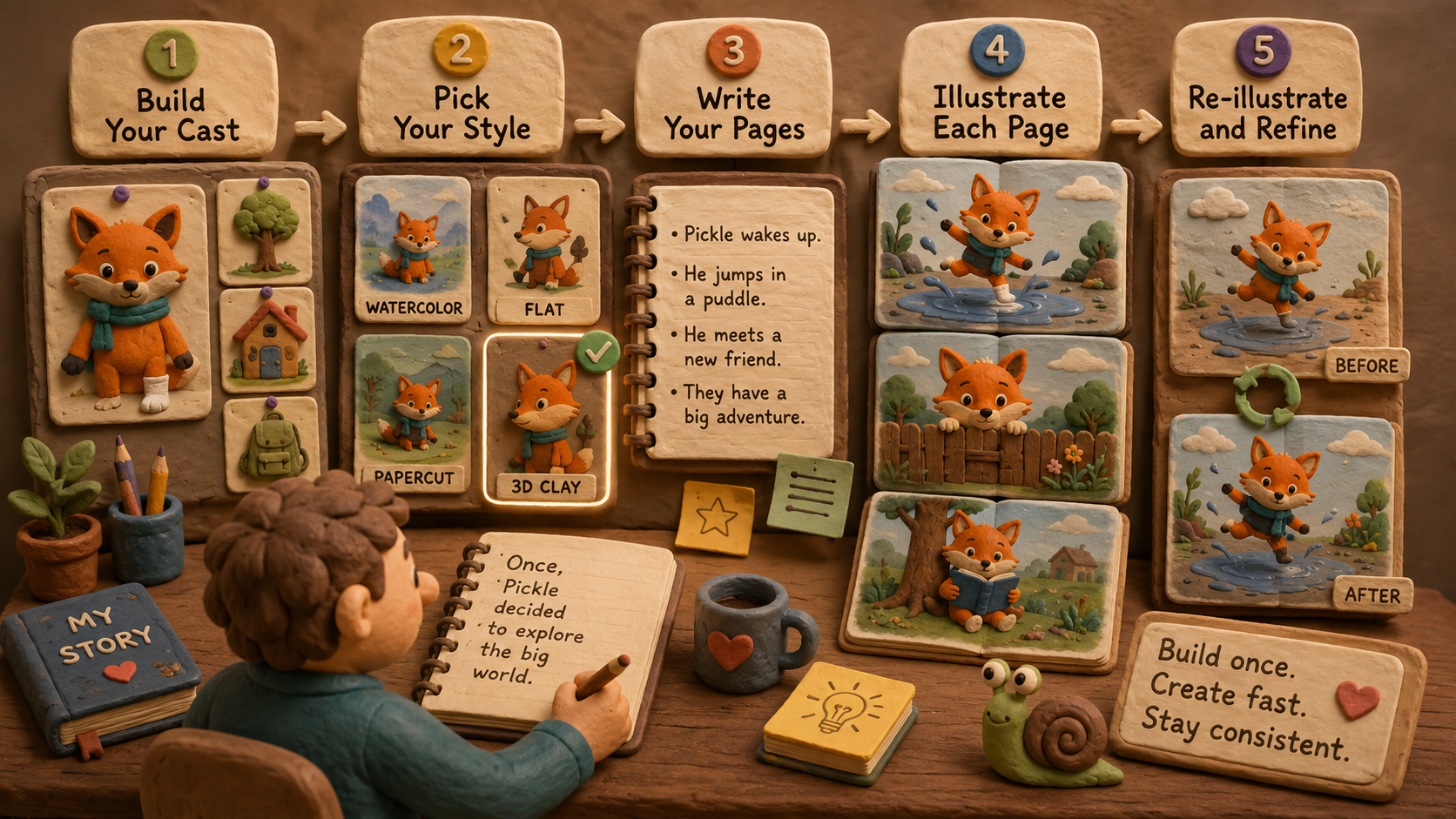
Strip away the hype and illustrating a book with AI is five plain steps. None of them require you to draw.
- Build your cast once. Your main character, the places they go, the props that matter. You describe each one, the AI gives you a look you approve, and it's saved. This is the part that does the heavy lifting later.
- Pick one style for the whole book. Watercolor, flat, pencil sketch, a 3D look, whatever fits the story. You choose it once and the book holds it.
- Write your pages. A line or two each, the way you'd read it aloud. This is your job, and it should stay your job.
- Illustrate each page. You describe what's happening on the page; your cast and style are already loaded, so you never re-describe the character or type a style word.
- Re-illustrate anything that's off. Page almost right? Run it again. The character stays locked while the scene changes.
Notice where the time goes. The first step, building the cast, is the one real investment. After that, every page is fast, because the hard question ("who is this character and what does she look like") is already answered.
What do I actually have to do, and what does the AI do?
Here's the honest division of labour. You own the idea, the words, the order of the pages, the feeling. You decide what each page shows. The AI's job is narrow and good: draw the thing you described, in your style, with your cast, consistently, again and again without getting tired or going off-model.
This is where the worry usually shows up, so let's say it out loud: isn't the AI doing the real creative work? No. Drawing a character the same way twice is craft, and it's craft you'd otherwise pay an illustrator for or spend years learning. The choices that make a book yours, the joke on page four, the quiet turn at the end, the exact words your kid will memorize, those are still yours. The tool can't have your voice. It just holds the pencil.
But will the art actually look good (and consistent)?
Good is on you to judge, and you can re-illustrate until it lands, so "good" is a thing you keep at, not a thing you gamble on. Consistent is the part a book-first tool is built to solve, and it solves it by saving your cast instead of asking you to re-summon it every page.
Picture it concretely. Say your hero is a fox your daughter named Pickle, orange, one white sock, a too-big scarf. Build Pickle once. Now "Pickle peeks over the fence" and "Pickle splashes in a puddle" both come back as the same fox, same sock, same scarf, in the same style, without you typing "orange fox white sock scarf watercolor" twenty-four times. That's the difference between a generator and an authoring tool.
This is exactly what we built Storybench to do. You build your cast and world once, every page inherits it, and you publish what you make. If you want the deeper version of the consistency story, we wrote a whole guide on keeping an AI character consistent across a book.
How do I publish it once it's illustrated?
A finished book that lives nowhere isn't finished. So the last step is getting files you can actually sell or print. From a book built this way you can export a print-ready PDF for Amazon KDP or print-on-demand, an EPUB for ebook stores, and image files of every page to show it off. Same book, different shelves, no redoing the work.
You can see how the whole path fits together on the for creators page, from first idea to a book you own.
Frequently asked questions
Do I need to know how to draw to illustrate a book with AI?
No. You describe characters and scenes in plain words; the AI draws. The skill you're really using is directing (deciding what each page shows), not illustration.
How do I keep the character looking the same on every page?
Use a tool that saves your character as a reusable cast member, so every page pulls from the same definition. Re-prompting from scratch each page is what causes drift. Building the cast once is what stops it.
Can I edit a page if the illustration is almost right?
Yes. Re-illustrate the page and the character stays locked while the scene changes, so you're refining, not rolling the dice. Editing is non-destructive and you own the result.
Is an AI-illustrated book really mine?
The book you author and direct is yours to publish and sell. You wrote the words and made every creative call; the AI illustrated to your direction.
The book in your head deserves better than a slot machine. When you're ready to make yours, come start your book and build your cast once. Page two will look like page one. Promise.